
Disclosure and scope: This site may earn a commission from links to some of the services discussed. Nothing here is sponsored. Prices quoted are figures visible in my own screenshots at capture time and are not current quotes; check the checkout page, discounts and auto-renewal state before paying. This is a personal usage impression, not a controlled availability or speed test.
Low price is why I first tried OwlProxy; the reason I kept using it is that the price and the experience still line up. I have bought a static residential line and used the pay-per-GB dynamic line. My impression: the static line is comparatively stable, the dynamic line is convenient because it is billed by traffic, and extracting lines from a web panel means no separate client to install. Cheap but unusable would still be a waste, so I judge both halves.
Pay per GB: what the price screen actually shows
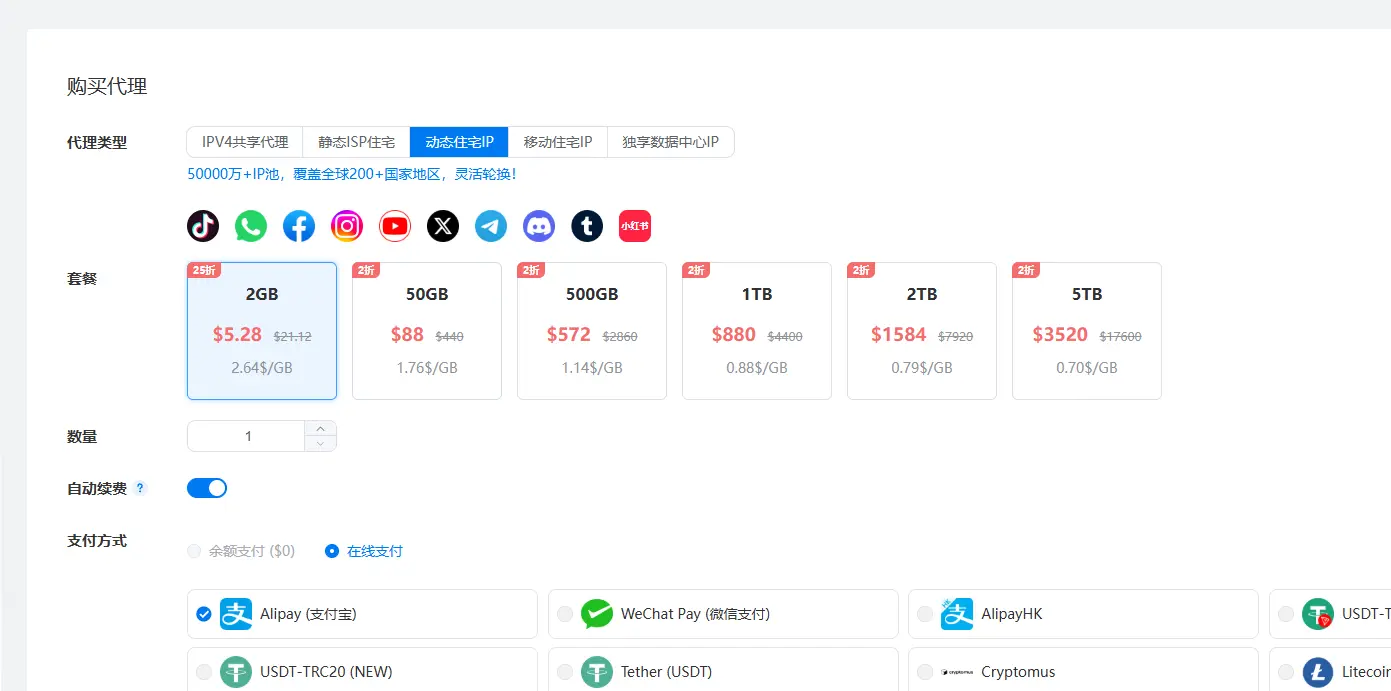
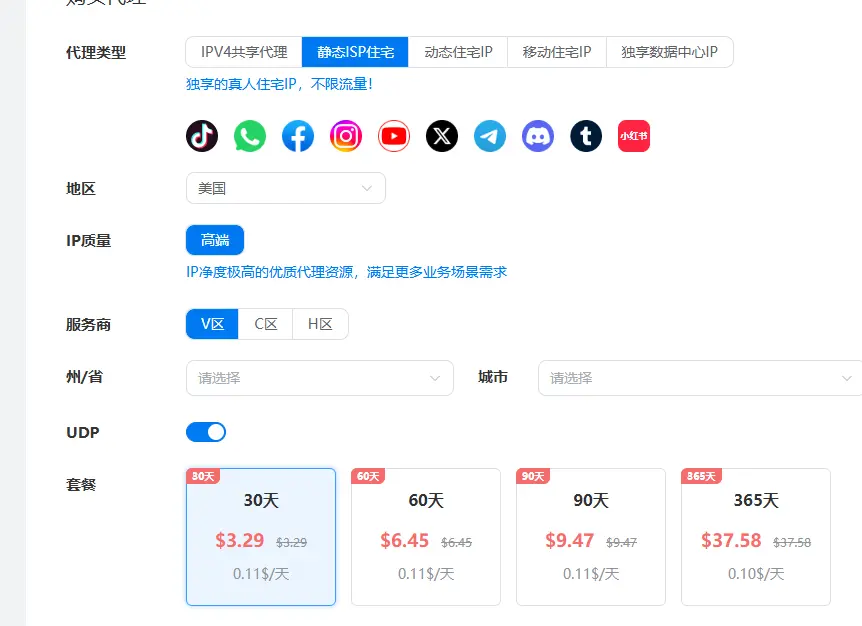
The dynamic residential screenshot shows a 2 GB package at US$5.28 (US$2.64/GB), and different tiers carry different unit prices. A static ISP residential screenshot shows US$3.29 for 30 days under a specific combination — US region, “premium” IP, V zone — with longer periods also listed. A third screen shows an IPv4 shared proxy, US B zone, 30 days at US$1.99. These are three different products under three different selections; they are not a price ladder and cannot be compared as if they were the same thing.
The useful habit is to convert everything into your own expected usage. If you expect roughly 2 GB a day for 30 days, that is about 60 GB, and a small 2 GB package tells you almost nothing about the final bill. Static vs Rotating Residential Proxies: Which Billing Model Costs Less works through the crossover between monthly and per-GB billing using explicitly hypothetical numbers.
Static line, dynamic line, and why I pick by task
| What I observed | How I use that information |
|---|---|
| Static residential line felt comparatively stable | Prefer it when a task wants the same address over a period |
| Dynamic line billed by traffic | Estimate volume first; short, light sessions fit it better |
| Lines extracted from a web panel | No dedicated client to install; still verify the exit IP after configuring |
| Datacentre IPs explicitly labelled | Lets me avoid buying the wrong type by accident — a practice I value |
| “IPs felt clean” | A personal impression only; I did not run a reputation or block-rate test |
What I do not claim
“Clean IPs” is my impression, not a measured block rate. I did not test uptime, latency, concurrency or per-site success, and I have not verified whether a free trial is currently offered — check the official site rather than relying on my older notes. Where a provider marks an IP as datacentre rather than residential, that label is the useful signal; it does not tell you how any given website will treat it.
Frequently asked questions
Is per-GB billing good for long video sessions?
Video consumes traffic steadily, so a small package can be exhausted quickly. Estimate hours × bitrate before buying; if your usage is high and steady, a monthly IP plan may be cheaper. Recalculate with your own numbers rather than the promotional per-GB rate.
Do I need static residential or dynamic residential?
If the same address must persist, look at static. If you need changing addresses or regions and your volume is modest, look at dynamic. Before You Buy a Static Residential IP: Eight Questions I Now Ask lists the questions I now ask before either purchase.
Is there a free trial?
I have not verified current trial or refund terms. Treat this as unknown and confirm on the official checkout page.
How to confirm the line is actually in use
This is a generic verification sequence for a proxy profile, not an additional test of OwlProxy and not a claim about any other provider. The point of the order is that each step rules out a different failure: credentials, protocol, authorisation, application binding, and finally real traffic. Screen labels differ between clients, so use the equivalents in yours.
| Check | Where to look | What it rules out |
|---|---|---|
| Extraction fields copied as shown | The web extraction panel | Typos in host, port or credentials. |
| Protocol selected in the client | The network settings of the app you use | A SOCKS5 line placed in an HTTP field. |
| Authentication mode | Provider dashboard: user/pass or IP allowlist | A stale allowlist after your own IP changed. |
| App actually bound to that line | Browser extension rule or profile setting | A saved profile that was never applied. |
| Visible IP before and after | Any page that echoes your public IP | Assuming a green “connected” badge means traffic moved. |
| Meter increments after real work | Dashboard traffic counter, with a timestamp | A line that is configured but idle. |
Reading a per-GB meter without over-interpreting it
A counter tells you that bytes were billed; it does not tell you that a task succeeded, and a single session does not establish an average. If you want a comparable figure, log the task type, start and end readings and the outcome on the same line, over several sessions, before dividing anything. For the other side of that comparison see my 2025 per-IP plan record and the worked billing-model example. Configuration steps are in What Is an Overseas Proxy, captcha attribution limits are in the inconclusive Hubstudio record, and the pre-purchase questions are collected in the static residential IP checklist.
Where to read next
Static vs Rotating Residential Proxies: Which Billing Model Costs Less for the billing model, Before You Buy a Static Residential IP: Eight Questions I Now Ask for the buying checklist, 922 Proxy: Per-IP Billing, Fine-Grained Locations and Google Captchas (2025 Notes) for my 2025 per-IP experience with 922, and Google Image Captchas With 922 Proxy in Hubstudio: What I Could Not Conclude for the captcha problem I could not attribute.