
Disclosure and scope: This site may earn a commission from links to some of the services discussed. Nothing here is sponsored, and no vendor supplied data or reviewed this page. Prices are what I personally paid or saw on screen on the dates stated. This is a single-user record on one Chinese carrier, not a benchmark, a speed test or a recommendation.
Original usage notes: 17 October 2026. Consistency check: 29 October 2026. A screen recording was added later, and the earlier “roughly ten-something seconds” impression and the recording are reported separately rather than merged.
What does Pioneer VPN feel like on a China Telecom connection? I paid ¥29.37 per month and bought two months. My everyday impression was that the connection was generally stable with occasional stuttering and no clear disconnects — but that connecting took a while. Initially I estimated “ten-something seconds” from memory. A later recording, started before the connect button was pressed, showed roughly 28–29 seconds instead. That is one recorded attempt, not an average.
What was actually recorded
| Item | This record |
|---|---|
| Service | Client displayed as Pioneer VPN |
| Network | China Telecom, inside mainland China; no finer location or access bandwidth logged |
| Payment | ¥29.37 per month, two months purchased |
| Connection wait | Everyday impression: “ten-something seconds”, never timed. One later recording: about 28–29 seconds from click to connected |
| Day-to-day behaviour | Generally stable, occasional stuttering, no clear disconnect during my use |
| Not recorded | Client version, exact date range, protocol, speed test, per-node results, peak-evening behaviour |
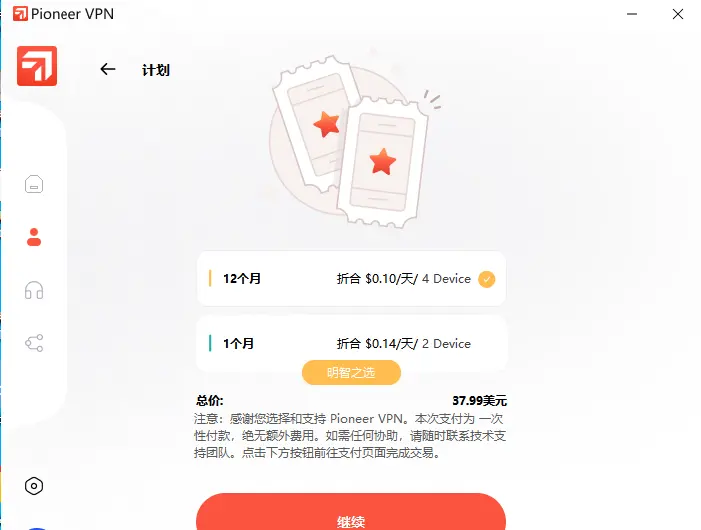
The plan screenshot adds a detail worth separating: the client showed daily USD equivalents and device counts, with a US$37.99 total for the selected annual plan. That is an interface price at one moment, not the ¥29.37/month transaction on my own bill. I keep the two figures apart instead of trying to reconcile them into one “current price”.
Does a long connection wait mean slow speeds afterwards?
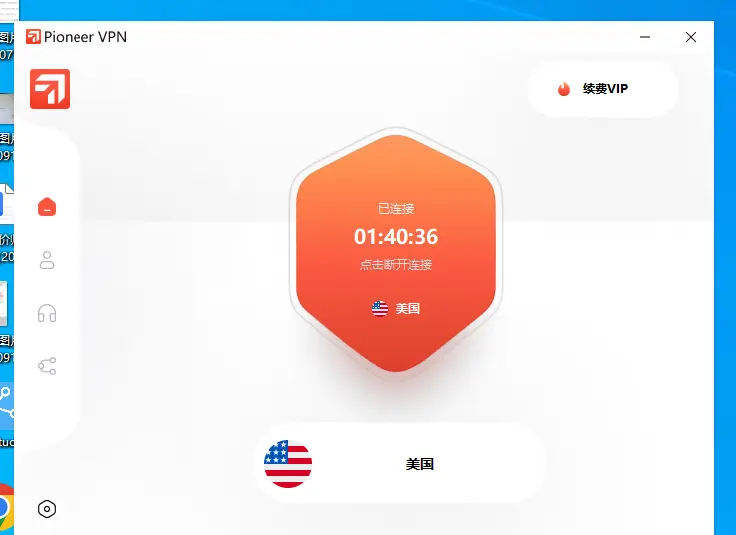
No. The wait is the time until the client reports “connected”; what happens afterwards is a separate question about page loading and throughput. I did not measure bandwidth or latency here, so I will not claim either was fast or slow. For the distinction, and for the frame-by-frame breakdown of the recording, see Slow VPN Connection vs Slow Browsing: What a 31-Second Recording Shows.
What this record cannot tell you
One attempt cannot establish an average connection time, and a two-month purchase is not two months of continuous testing. It says nothing about other carriers, other regions, other nodes or other client versions. “No clear disconnect” means I did not observe one; it is not an uptime percentage. The original uncut recording was about 1 minute 43 seconds and the client was not visible throughout the later browsing, so it cannot prove there were no dropouts across the whole session.
Frequently asked questions
How long does Pioneer VPN take to connect?
In the one recording I have, roughly 28–29 seconds elapsed between the click and the “connected” state. My earlier un-timed impression was shorter. I have no set of repeated measurements, so there is no average to quote.
Is ¥29.37 the current price?
It is what I personally paid for two months. The client also displayed USD daily equivalents and a US$37.99 annual total. Treat the interface price and my invoice as separate records and check the current checkout page yourself.
Does this apply to other carriers or countries?
No. This is one China Telecom environment. I did not log the finer location, access bandwidth, protocol or server-side details needed to generalise.
Which platforms and download channels exist?
I have not verified the full client list or official download channels, so I will not list them. Use the publisher’s own site and check the platform support before paying.
How to log a connection wait reproducibly
One recording cannot produce an average. If you want your own numbers to be comparable later, this is the blank log template I would use: a generic record format, not new measurements, and not a claim about any other carrier or client. Keep the page and node fixed between attempts, and change one thing at a time.
| Field | How to record it | Do not write it as |
|---|---|---|
| Start and end of the wait | Timestamps from the same clock, or a screen recording | “About half a minute” |
| Client and OS version | From the app / system info screen | “The latest version” |
| Node or region selected | The exact label shown in the client | “A nearby server” |
| Connection type | Carrier, wired or Wi-Fi, and whether anything else was running | “My internet” |
| Page tested after connecting | One fixed URL, opened the same way each time | “Browsing was slow” |
| Outcome per attempt | Connected / failed / disconnected, plus any on-screen message | A general impression across several tries |
Three readings that are easy to mix up
Time until the client says connected is a handshake or setup phase. Time until the first page renders includes DNS, the site itself and whatever else was loading. Sustained speed during a session is a third thing entirely. A long wait in the first column does not by itself predict the third, which is the point of the separate recording breakdown. For the underlying concept see What Is a VPN?, and for the ordinary setup sequence How to Set Up a VPN. If the question is whether paying is worth it at all, the free-versus-paid reasoning, the Proton free-plan limits and the Mullvad documentation read-through approach it from three different angles. None of these changes the scope of the single-user record above.
Where to read next
The recording analysis is in Slow VPN Connection vs Slow Browsing: What a 31-Second Recording Shows; the paid-versus-free reasoning is in Are Free VPNs Enough? What Paying ¥29.37 a Month Actually Changed; official-plan comparisons without a connection test are in Is Proton VPN Free Worth Using? What the Free Plan Actually Includes and Mullvad VPN: €5 a Month, 5 Devices, and the Refund Rules Worth Checking.
Source: my own Chinese-language notes dated 17 October 2026, checked 29 October 2026. Figures not listed above were not measured.