
Disclosure and scope: This site may earn a commission from links to some of the services discussed. This is a single clipped recording on one China Telecom connection with one VPN client. No bandwidth or latency was measured, no repeated trials were run, and no vendor supplied data.
“The VPN is slow” usually means one of two different things: waiting for the connection to establish, or pages loading slowly after the client says “connected”. Occasional stuttering and an actual disconnect are two more separate cases. Treating them as one problem leads to the wrong fix. My current service is Pioneer on China Telecom at ¥29.37 per month, bought for two months.
| Situation | What it looks like |
|---|---|
| Long connection wait | Client keeps showing “connecting” with no connected state |
| Slow pages after connecting | Connected, but content or images take a long time to appear |
| Stuttering | A brief pause during an activity that then resumes |
| Disconnect | Client shows disconnected or reconnecting; may need manual action |
The recording, frame by frame
The published clip is about 31 seconds. Only the client window is kept, the desktop and later browsing footage are cropped out, the audio track is removed, and nothing is sped up or retimed.
| Point in clip | Observed |
|---|---|
| 0 s | “Not connected”, timer 00:00:00, client showing a US node |
| ~1 s | Connect clicked; shield turns orange, “connecting” |
| Up to ~28 s | Still “connecting”, timer remains 00:00:00 |
| ~28–29 s | “Connected” appears and the connection timer starts |
| 30 s | “Connected”, timer 00:00:02 |

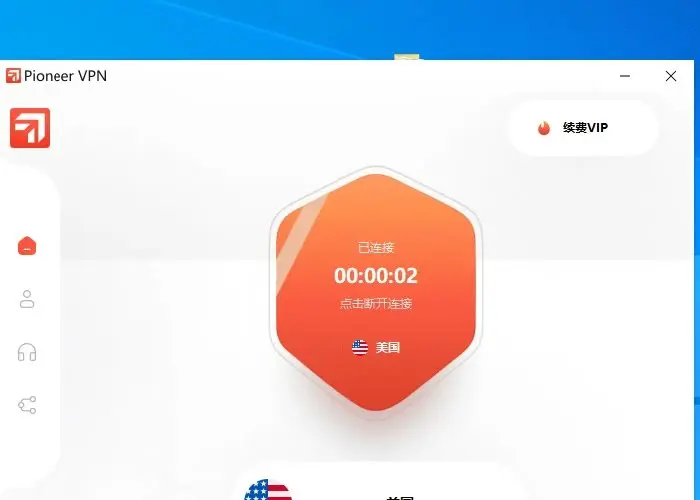
What happened after connecting
In the clip, search results and other pages do gradually display content. That is a qualitative observation, not a page-load measurement: I did not record timings, DNS, or bandwidth. My day-to-day impression was generally stable with occasional stuttering and no clear disconnect. The original uncut recording was about 1 minute 43 seconds, and the client was not visible throughout the later browsing, so it cannot prove there were no dropouts for the whole session — and certainly says nothing about long-term stability.
Frequently asked questions
If connecting takes 28 seconds, is the connection slow afterwards?
Not necessarily. Connection establishment and post-connection throughput are separate stages. This recording measures the first, not the second; I did not measure speed at all.
The client says connected but pages will not open — is that the same problem?
No. That is the second case. Record which sites failed, the time, and whether a reconnect changed anything, rather than re-running a connection-speed test that cannot answer it.
Does a VPN make the internet faster?
No. It changes the route some traffic takes and encrypts the link to the VPN server; it does not increase your broadband capacity. What Is a VPN? A Plain-English Explanation of the Encrypted Relay explains the mechanism.
How should I log this on my own connection?
Write down carrier, date and time, node, click-to-connected time, then page behaviour after connecting, and any stutter or disconnect as separate lines. One row per attempt makes an average meaningful later.
A six-field log template
One clipped recording is not a measurement series. This is the blank template for making your own runs comparable: no new figures, no new carrier or client claims, just the fields that are usually missing when someone later asks “slow compared with what?”. Hold the page and node fixed and change one condition at a time.
| Field | How to record it | Do not write it as |
|---|---|---|
| Wait start and end | Timestamps from one clock, or continuous screen recording | “About 30 seconds” |
| Client and OS version | Copied from the app / system info screen | “The current version” |
| Node or region | The exact label shown in the client | “A nearby server” |
| Local connection | Carrier, wired or Wi-Fi, other tunnels active | “My internet” |
| Page opened after connecting | One fixed URL, opened the same way each run | “Pages were slow” |
| Outcome per run | Connected / failed / dropped, plus the on-screen message | One impression across several attempts |
Three readings people often confuse
Connection wait ends when the client says connected. First-page delay includes name resolution, the site and anything loading alongside it. Sustained responsiveness during a session is a separate observation again. Conflating them is how a single 28-second wait becomes a claim about speed. For the underlying concept see What Is a VPN?; for the ordinary setup path How to Set Up a VPN; for the service with first-hand connection notes on this site the Pioneer record. Whether any of this justifies paying is a different question, covered in the free-versus-paid reasoning, the Proton free-plan limits and the Mullvad documentation checklist.
Where to read next
Pioneer VPN on China Telecom: ¥29.37 a Month and a 28-Second Connection has the full single-user record and payment details, Are Free VPNs Enough? What Paying ¥29.37 a Month Actually Changed covers the paid-versus-free reasoning, and How to Set Up a VPN: The Steps That Usually Matter (and the Ones That Don’t) is the basic setup sequence.
One recording, one carrier, one client version. Do not extrapolate this 28-second figure to other networks, nodes or services.